>
>
>
>
 |
|  |
|  |
|  |
|  |
|
|
|  |
|  |
|  |
|  |
|  |
## Dependencies
- Python 3.8
- PyTorch 1.8.0
- NVIDIA GPU + [CUDA](https://developer.nvidia.com/cuda-downloads)
```bash
# Clone the github repo and go to the default directory 'DAT'.
git clone https://github.com/zhengchen1999/DAT.git
pip install -r requirements.txt
python setup.py develop
```
## Contents
1. [Datasets](#Datasets)
1. [Models](#Models)
1. [Training](#Training)
1. [Testing](#Testing)
1. [Results](#Results)
1. [Citation](#Citation)
1. [Acknowledgements](#Acknowledgements)
---
## Datasets
Used training and testing sets can be downloaded as follows:
| Training Set | Testing Set | Visual Results |
| :----------------------------------------------------------- | :----------------------------------------------------------: | :----------------------------------------------------------: |
| [DIV2K](https://data.vision.ee.ethz.ch/cvl/DIV2K/) (800 training images) + [Flickr2K](https://cv.snu.ac.kr/research/EDSR/Flickr2K.tar) (2650 images) [complete training dataset [DF2K](https://drive.google.com/file/d/1TubDkirxl4qAWelfOnpwaSKoj3KLAIG4/view?usp=share_link)] | Set5 + Set14 + BSD100 + Urban100 + Manga109 [complete testing dataset [download](https://drive.google.com/file/d/1yMbItvFKVaCT93yPWmlP3883XtJ-wSee/view?usp=sharing)] | [here](https://drive.google.com/drive/folders/1ZMaZyCer44ZX6tdcDmjIrc_hSsKoMKg2?usp=drive_link) |
Download training and testing datasets and put them into the corresponding folders of `datasets/` and `restormer/datasets`. See [datasets](datasets/README.md) for the detail of directory structure.
## Models
| Method | Params (M) | FLOPs (G) | Dataset | PSNR (dB) | SSIM | Model Zoo | Visual Results |
| :----- | :--------: | :-------: | :------: | :-------: | :----: | :----------------------------------------------------------: | :----------------------------------------------------------: |
| DAT-S | 11.21 | 203.3 | Urban100 | 27.68 | 0.8300 | [Google Drive](https://drive.google.com/drive/folders/1hb77nOTpCo9iU_jmg_izHOPRvPJujRiL?usp=drive_link) | [Google Drive](https://drive.google.com/file/d/1W-CeN2Z0e1r0rOdc3t-GcGrRV-qTGdub/view?usp=drive_link) |
| DAT | 14.80 | 275.8 | Urban100 | 27.87 | 0.8343 | [Google Drive](https://drive.google.com/drive/folders/1eZqgQEBQ69Vzf8afrPkvL27JHubW6o0t?usp=drive_link) | [Google Drive](https://drive.google.com/file/d/1B4zJsZaiVsu009ilTh81BV7-8Hr98BI2/view?usp=drive_link) |
The performance is reported on Urban100 (x4, SR). The test input size of FLOPs is 128 x 128.
## Training
- Download [training](https://drive.google.com/file/d/1TubDkirxl4qAWelfOnpwaSKoj3KLAIG4/view?usp=share_link) (DF2K, already processed) and [testing](https://drive.google.com/file/d/1yMbItvFKVaCT93yPWmlP3883XtJ-wSee/view?usp=sharing) (Set5, Set14, BSD100, Urban100, Manga109, already processed) datasets, place them in `datasets/`.
- Run the following scripts. The training configuration is in `options/train/`.
```shell
# DAT-S, input=64x64, 4 GPUs
python -m torch.distributed.launch --nproc_per_node=4 --master_port=4321 basicsr/train.py -opt options/Train/train_DAT_S_x2.yml --launcher pytorch
python -m torch.distributed.launch --nproc_per_node=4 --master_port=4321 basicsr/train.py -opt options/Train/train_DAT_S_x3.yml --launcher pytorch
python -m torch.distributed.launch --nproc_per_node=4 --master_port=4321 basicsr/train.py -opt options/Train/train_DAT_S_x4.yml --launcher pytorch
# DAT, input=64x64, 4 GPUs
python -m torch.distributed.launch --nproc_per_node=4 --master_port=4321 basicsr/train.py -opt options/Train/train_DAT_x2.yml --launcher pytorch
python -m torch.distributed.launch --nproc_per_node=4 --master_port=4321 basicsr/train.py -opt options/Train/train_DAT_x3.yml --launcher pytorch
python -m torch.distributed.launch --nproc_per_node=4 --master_port=4321 basicsr/train.py -opt options/Train/train_DAT_x4.yml --launcher pytorch
```
- The training experiment is in `experiments/`.
## Testing
- Download the pre-trained [models](https://drive.google.com/drive/folders/1iBdf_-LVZuz_PAbFtuxSKd_11RL1YKxM?usp=drive_link) and place them in `experiments/pretrained_models/`.
We provide pre-trained models for image SR: DAT-S and DAT (x2, x3, x4).
- Download [testing](https://ufile.io/6ek67nf8) (Set5, Set14, BSD100, Urban100, Manga109) datasets, place them in `datasets/`.
- Run the following scripts. The testing configuration is in `options/test/`.
```shell
# No self-ensemble
# DAT-S, reproduces results in Table 2 of the main paper
python basicsr/test.py -opt options/Test/test_DAT_S_x2.yml
python basicsr/test.py -opt options/Test/test_DAT_S_x3.yml
python basicsr/test.py -opt options/Test/test_DAT_S_x4.yml
# DAT, reproduces results in Table 2 of the main paper
python basicsr/test.py -opt options/Test/test_DAT_x2.yml
python basicsr/test.py -opt options/Test/test_DAT_x3.yml
python basicsr/test.py -opt options/Test/test_DAT_x4.yml
```
- The output is in `results/`.
## Results
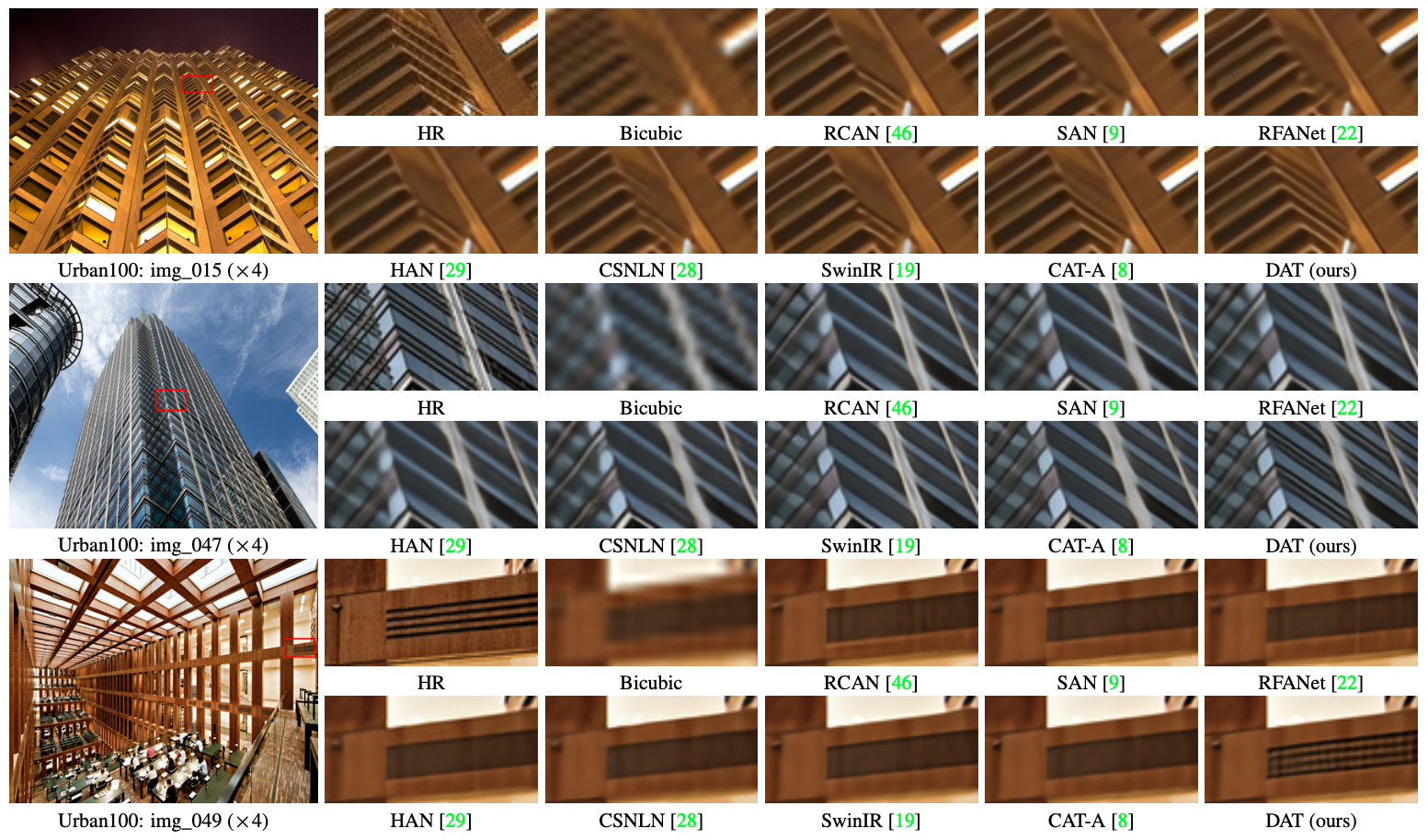
We achieved state-of-the-art performance on image SR, JPEG compression artifact reduction and real image denoising. Detailed results can be found in the paper. All visual results of CAT can be downloaded [here](https://drive.google.com/drive/folders/1SIQ342yyrlHTCxINf9wYNchOa5eOw_7s?usp=sharing).
|
## Dependencies
- Python 3.8
- PyTorch 1.8.0
- NVIDIA GPU + [CUDA](https://developer.nvidia.com/cuda-downloads)
```bash
# Clone the github repo and go to the default directory 'DAT'.
git clone https://github.com/zhengchen1999/DAT.git
pip install -r requirements.txt
python setup.py develop
```
## Contents
1. [Datasets](#Datasets)
1. [Models](#Models)
1. [Training](#Training)
1. [Testing](#Testing)
1. [Results](#Results)
1. [Citation](#Citation)
1. [Acknowledgements](#Acknowledgements)
---
## Datasets
Used training and testing sets can be downloaded as follows:
| Training Set | Testing Set | Visual Results |
| :----------------------------------------------------------- | :----------------------------------------------------------: | :----------------------------------------------------------: |
| [DIV2K](https://data.vision.ee.ethz.ch/cvl/DIV2K/) (800 training images) + [Flickr2K](https://cv.snu.ac.kr/research/EDSR/Flickr2K.tar) (2650 images) [complete training dataset [DF2K](https://drive.google.com/file/d/1TubDkirxl4qAWelfOnpwaSKoj3KLAIG4/view?usp=share_link)] | Set5 + Set14 + BSD100 + Urban100 + Manga109 [complete testing dataset [download](https://drive.google.com/file/d/1yMbItvFKVaCT93yPWmlP3883XtJ-wSee/view?usp=sharing)] | [here](https://drive.google.com/drive/folders/1ZMaZyCer44ZX6tdcDmjIrc_hSsKoMKg2?usp=drive_link) |
Download training and testing datasets and put them into the corresponding folders of `datasets/` and `restormer/datasets`. See [datasets](datasets/README.md) for the detail of directory structure.
## Models
| Method | Params (M) | FLOPs (G) | Dataset | PSNR (dB) | SSIM | Model Zoo | Visual Results |
| :----- | :--------: | :-------: | :------: | :-------: | :----: | :----------------------------------------------------------: | :----------------------------------------------------------: |
| DAT-S | 11.21 | 203.3 | Urban100 | 27.68 | 0.8300 | [Google Drive](https://drive.google.com/drive/folders/1hb77nOTpCo9iU_jmg_izHOPRvPJujRiL?usp=drive_link) | [Google Drive](https://drive.google.com/file/d/1W-CeN2Z0e1r0rOdc3t-GcGrRV-qTGdub/view?usp=drive_link) |
| DAT | 14.80 | 275.8 | Urban100 | 27.87 | 0.8343 | [Google Drive](https://drive.google.com/drive/folders/1eZqgQEBQ69Vzf8afrPkvL27JHubW6o0t?usp=drive_link) | [Google Drive](https://drive.google.com/file/d/1B4zJsZaiVsu009ilTh81BV7-8Hr98BI2/view?usp=drive_link) |
The performance is reported on Urban100 (x4, SR). The test input size of FLOPs is 128 x 128.
## Training
- Download [training](https://drive.google.com/file/d/1TubDkirxl4qAWelfOnpwaSKoj3KLAIG4/view?usp=share_link) (DF2K, already processed) and [testing](https://drive.google.com/file/d/1yMbItvFKVaCT93yPWmlP3883XtJ-wSee/view?usp=sharing) (Set5, Set14, BSD100, Urban100, Manga109, already processed) datasets, place them in `datasets/`.
- Run the following scripts. The training configuration is in `options/train/`.
```shell
# DAT-S, input=64x64, 4 GPUs
python -m torch.distributed.launch --nproc_per_node=4 --master_port=4321 basicsr/train.py -opt options/Train/train_DAT_S_x2.yml --launcher pytorch
python -m torch.distributed.launch --nproc_per_node=4 --master_port=4321 basicsr/train.py -opt options/Train/train_DAT_S_x3.yml --launcher pytorch
python -m torch.distributed.launch --nproc_per_node=4 --master_port=4321 basicsr/train.py -opt options/Train/train_DAT_S_x4.yml --launcher pytorch
# DAT, input=64x64, 4 GPUs
python -m torch.distributed.launch --nproc_per_node=4 --master_port=4321 basicsr/train.py -opt options/Train/train_DAT_x2.yml --launcher pytorch
python -m torch.distributed.launch --nproc_per_node=4 --master_port=4321 basicsr/train.py -opt options/Train/train_DAT_x3.yml --launcher pytorch
python -m torch.distributed.launch --nproc_per_node=4 --master_port=4321 basicsr/train.py -opt options/Train/train_DAT_x4.yml --launcher pytorch
```
- The training experiment is in `experiments/`.
## Testing
- Download the pre-trained [models](https://drive.google.com/drive/folders/1iBdf_-LVZuz_PAbFtuxSKd_11RL1YKxM?usp=drive_link) and place them in `experiments/pretrained_models/`.
We provide pre-trained models for image SR: DAT-S and DAT (x2, x3, x4).
- Download [testing](https://ufile.io/6ek67nf8) (Set5, Set14, BSD100, Urban100, Manga109) datasets, place them in `datasets/`.
- Run the following scripts. The testing configuration is in `options/test/`.
```shell
# No self-ensemble
# DAT-S, reproduces results in Table 2 of the main paper
python basicsr/test.py -opt options/Test/test_DAT_S_x2.yml
python basicsr/test.py -opt options/Test/test_DAT_S_x3.yml
python basicsr/test.py -opt options/Test/test_DAT_S_x4.yml
# DAT, reproduces results in Table 2 of the main paper
python basicsr/test.py -opt options/Test/test_DAT_x2.yml
python basicsr/test.py -opt options/Test/test_DAT_x3.yml
python basicsr/test.py -opt options/Test/test_DAT_x4.yml
```
- The output is in `results/`.
## Results
We achieved state-of-the-art performance on image SR, JPEG compression artifact reduction and real image denoising. Detailed results can be found in the paper. All visual results of CAT can be downloaded [here](https://drive.google.com/drive/folders/1SIQ342yyrlHTCxINf9wYNchOa5eOw_7s?usp=sharing).