Instructions to use anikifoss/Kimi-K2-Instruct-DQ4_K with libraries, inference providers, notebooks, and local apps. Follow these links to get started.
- Libraries
- llama-cpp-python
How to use anikifoss/Kimi-K2-Instruct-DQ4_K with llama-cpp-python:
# !pip install llama-cpp-python from llama_cpp import Llama llm = Llama.from_pretrained( repo_id="anikifoss/Kimi-K2-Instruct-DQ4_K", filename="Kimi-K2-Instruct-DQ4_K-00001-of-00014.gguf", )
llm.create_chat_completion( messages = [ { "role": "user", "content": "What is the capital of France?" } ] ) - Notebooks
- Google Colab
- Kaggle
- Local Apps
- llama.cpp
How to use anikifoss/Kimi-K2-Instruct-DQ4_K with llama.cpp:
Install from brew
brew install llama.cpp # Start a local OpenAI-compatible server with a web UI: llama-server -hf anikifoss/Kimi-K2-Instruct-DQ4_K # Run inference directly in the terminal: llama-cli -hf anikifoss/Kimi-K2-Instruct-DQ4_K
Install from WinGet (Windows)
winget install llama.cpp # Start a local OpenAI-compatible server with a web UI: llama-server -hf anikifoss/Kimi-K2-Instruct-DQ4_K # Run inference directly in the terminal: llama-cli -hf anikifoss/Kimi-K2-Instruct-DQ4_K
Use pre-built binary
# Download pre-built binary from: # https://github.com/ggerganov/llama.cpp/releases # Start a local OpenAI-compatible server with a web UI: ./llama-server -hf anikifoss/Kimi-K2-Instruct-DQ4_K # Run inference directly in the terminal: ./llama-cli -hf anikifoss/Kimi-K2-Instruct-DQ4_K
Build from source code
git clone https://github.com/ggerganov/llama.cpp.git cd llama.cpp cmake -B build cmake --build build -j --target llama-server llama-cli # Start a local OpenAI-compatible server with a web UI: ./build/bin/llama-server -hf anikifoss/Kimi-K2-Instruct-DQ4_K # Run inference directly in the terminal: ./build/bin/llama-cli -hf anikifoss/Kimi-K2-Instruct-DQ4_K
Use Docker
docker model run hf.co/anikifoss/Kimi-K2-Instruct-DQ4_K
- LM Studio
- Jan
- vLLM
How to use anikifoss/Kimi-K2-Instruct-DQ4_K with vLLM:
Install from pip and serve model
# Install vLLM from pip: pip install vllm # Start the vLLM server: vllm serve "anikifoss/Kimi-K2-Instruct-DQ4_K" # Call the server using curl (OpenAI-compatible API): curl -X POST "http://localhost:8000/v1/chat/completions" \ -H "Content-Type: application/json" \ --data '{ "model": "anikifoss/Kimi-K2-Instruct-DQ4_K", "messages": [ { "role": "user", "content": "What is the capital of France?" } ] }'Use Docker
docker model run hf.co/anikifoss/Kimi-K2-Instruct-DQ4_K
- Ollama
How to use anikifoss/Kimi-K2-Instruct-DQ4_K with Ollama:
ollama run hf.co/anikifoss/Kimi-K2-Instruct-DQ4_K
- Unsloth Studio
How to use anikifoss/Kimi-K2-Instruct-DQ4_K with Unsloth Studio:
Install Unsloth Studio (macOS, Linux, WSL)
curl -fsSL https://unsloth.ai/install.sh | sh # Run unsloth studio unsloth studio -H 0.0.0.0 -p 8888 # Then open http://localhost:8888 in your browser # Search for anikifoss/Kimi-K2-Instruct-DQ4_K to start chatting
Install Unsloth Studio (Windows)
irm https://unsloth.ai/install.ps1 | iex # Run unsloth studio unsloth studio -H 0.0.0.0 -p 8888 # Then open http://localhost:8888 in your browser # Search for anikifoss/Kimi-K2-Instruct-DQ4_K to start chatting
Using HuggingFace Spaces for Unsloth
# No setup required # Open https://huggingface.co/spaces/unsloth/studio in your browser # Search for anikifoss/Kimi-K2-Instruct-DQ4_K to start chatting
- Pi
How to use anikifoss/Kimi-K2-Instruct-DQ4_K with Pi:
Start the llama.cpp server
# Install llama.cpp: brew install llama.cpp # Start a local OpenAI-compatible server: llama-server -hf anikifoss/Kimi-K2-Instruct-DQ4_K
Configure the model in Pi
# Install Pi: npm install -g @mariozechner/pi-coding-agent # Add to ~/.pi/agent/models.json: { "providers": { "llama-cpp": { "baseUrl": "http://localhost:8080/v1", "api": "openai-completions", "apiKey": "none", "models": [ { "id": "anikifoss/Kimi-K2-Instruct-DQ4_K" } ] } } }Run Pi
# Start Pi in your project directory: pi
- Hermes Agent new
How to use anikifoss/Kimi-K2-Instruct-DQ4_K with Hermes Agent:
Start the llama.cpp server
# Install llama.cpp: brew install llama.cpp # Start a local OpenAI-compatible server: llama-server -hf anikifoss/Kimi-K2-Instruct-DQ4_K
Configure Hermes
# Install Hermes: curl -fsSL https://hermes-agent.nousresearch.com/install.sh | bash hermes setup # Point Hermes at the local server: hermes config set model.provider custom hermes config set model.base_url http://127.0.0.1:8080/v1 hermes config set model.default anikifoss/Kimi-K2-Instruct-DQ4_K
Run Hermes
hermes
- Docker Model Runner
How to use anikifoss/Kimi-K2-Instruct-DQ4_K with Docker Model Runner:
docker model run hf.co/anikifoss/Kimi-K2-Instruct-DQ4_K
- Lemonade
How to use anikifoss/Kimi-K2-Instruct-DQ4_K with Lemonade:
Pull the model
# Download Lemonade from https://lemonade-server.ai/ lemonade pull anikifoss/Kimi-K2-Instruct-DQ4_K
Run and chat with the model
lemonade run user.Kimi-K2-Instruct-DQ4_K-{{QUANT_TAG}}List all available models
lemonade list
Great quality model! Very low perplexity!

Heya @anikifoss just wanted to congratulate you for having the lowest perplexity quant that I've measured thus far! Your DQ4_K is very close to full quality Q8_0 perplexity while saving a lot of space and fitting comfortably in a single 768GB RAM NUMA node. Great job and thanks for all your help testing and getting this merged into ik_llama.cpp for max speed as well!
Q8_0Final estimate: PPL = 2.9507 +/- 0.01468DQ4_KFinal estimate: PPL = 2.9691 +/- 0.01480UD-Q4_K_XLFinal estimate: PPL = 3.0612 +/- 0.01550
Your quant might be good for @ChuckMcSneed as discussed here and @Nark103 as discussed here
After doing a lot of quants and testing even more, my impression is that Kimi-K2-Instruct is more sensitive to quantization of the attn/shexp/blk.0.ffn* tensors than DeepSeek. This would likely make sense given Kimi-K2 architecture uses half the attn heads and 33% of the first ffn dense layers while adding more routed exps as shown in this image.
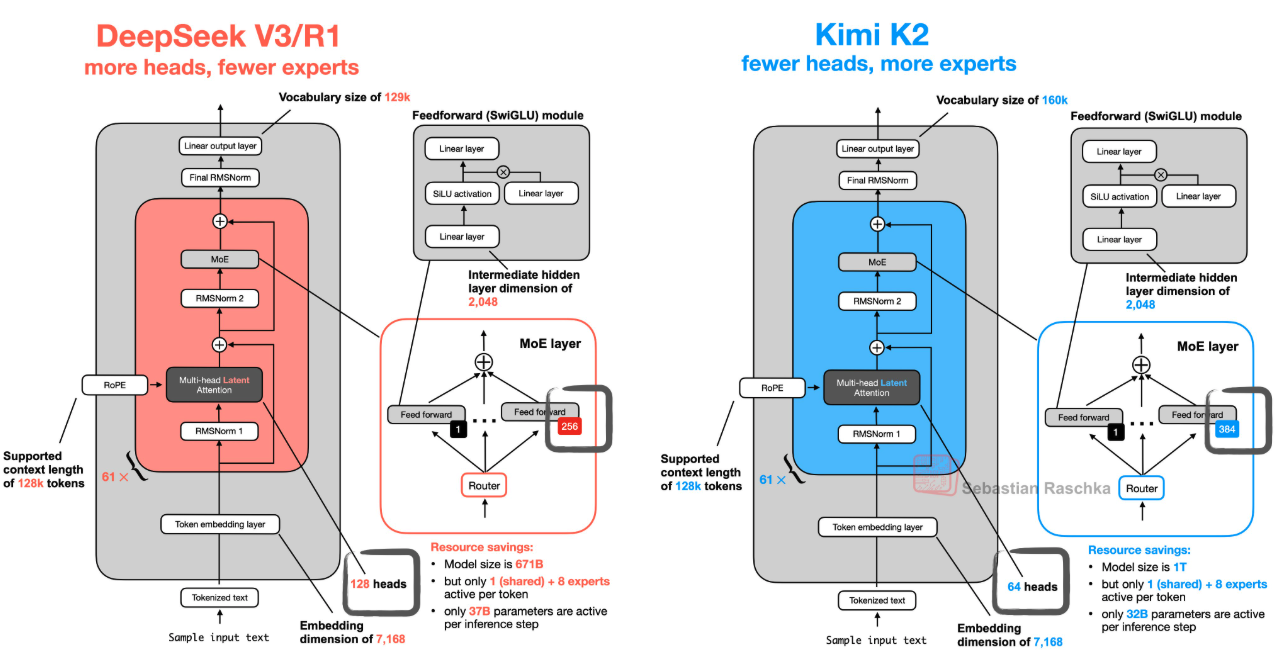
Cheers!
P.S. Have fun playing with your "new" AMD GPUs haha!
Thanks for checking the perplexity! I'm suprised there are enough people who want to use chunky quants. "There are dozens of us, DOZENS!"
Reading the other posts gave me more ideas: I should try quantizing token_embd.weight and output.weight as f16
Right, @ChuckMcSneed was showing the original fp8 safetensors actually has bf16 for some tensors including token embedding.
While f16 has better "precision" as it were over a lower range of numbers, bf16 allows for a wider range with bigger min and max values.
I can't find a good image to show the difference. But if you cast bf16 to f16 be careful of potential clipping if the bf16 values including numbers outside the range you can represent with f16.
I'm not really sure how to check for this. There might be something in the available tooling already though, or it might print a warning before clipping values?
I can't find a good image to show the difference. But if you cast bf16 to f16 be careful of potential clipping if the bf16 values including numbers outside the range you can represent with f16.
Good point, I should keep those bf16 if they already are. I think bf16 is also supported in GGUF.
aye, i've only ever used bf16 gguf for the "original" from which i make the quants. though i've seen others use f16 for some models in the past. i try to keep the GGUF the dtype as whatever the safetensors are using.
also cool seeing updates on your 4x new GPUs! (i gotta ask over there if your success with ROCm/HIP was with mainline llama.cpp or ik? i got vulkan working with both mainline and ik, but rocm only with mainline last i tried.
Yeah, ik_llama is missing ROCm support entirely. I tried Vulka, but it only detects 16GB for each MI50 GPU. Aparently it's a bug that can be fixed by flashing MI50's BIOS, but I decided not to flash just yet.