
Hub documentation
Publisher Analytics
Publisher Analytics
This feature is part of the Team & Enterprise plans.
Publisher Analytics Dashboard
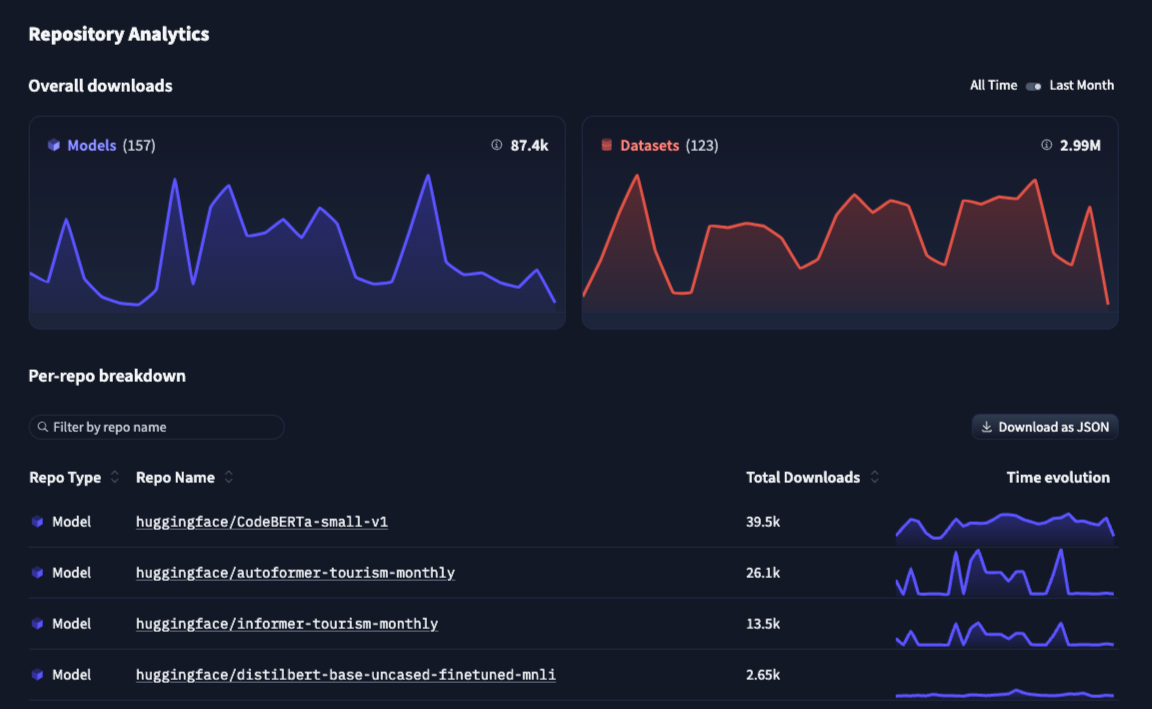
Track all your repository activity with a detailed downloads overview that shows total downloads for all the Models and Datasets published by your organization. Toggle between “All Time” and “Last Month” views to gain insights across your repositories over different periods.

Per-repo breakdown
Explore the metrics of individual repositories with the per-repository drill-down table. Utilize the built-in search feature to quickly locate specific repositories. Each row also features a time-series graph that illustrates the trend of downloads over time.
Export Publisher Analytics as CSV
Download a comprehensive CSV file containing analytics for all your repositories, including model and dataset download activity.
You can also access this data programmatically via the following API endpoint:
curl -H "Authorization: Bearer YOUR_ACCESS_TOKEN" \
  "https://huggingface.co/organizations/YOUR_ORG_NAME/settings/publisher-analytics/download-breakdown" \
  --output breakdown.csv
Response Structure
The CSV file is made of daily download records for each of your models and datasets.
repoType,repoName,total,timestamp,downloads
model,huggingface/CodeBERTa-small-v1,4362460,2021-01-22T00:00:00.000Z,4
model,huggingface/CodeBERTa-small-v1,4362460,2021-01-23T00:00:00.000Z,7
model,huggingface/CodeBERTa-small-v1,4362460,2021-01-24T00:00:00.000Z,2
dataset,huggingface/documentation-images,2167284,2021-11-27T00:00:00.000Z,3
dataset,huggingface/documentation-images,2167284,2021-11-28T00:00:00.000Z,18
dataset,huggingface/documentation-images,2167284,2021-11-29T00:00:00.000Z,7
Repository Object Structure
Each record in the CSV contains:
repoType: The type of repository (e.g., “model”, “dataset”)repoName: Full repository name including organization (e.g., “huggingface/documentation-images”)total: Cumulative number of downloads for this repositorytimestamp: ISO 8601 formatted date (UTC)downloads: Number of downloads for that day
Records are ordered chronologically and provide a daily granular view of download activity for each repository.
Download figures are not deduplicated by user. If you need unique download counts, refer to the Unique downloaders and more granular logs section.
Blog Analytics
If your organization publishes blog posts on the Hub, you can download the daily traffic of every published post from the Blog Analytics tab of your organization’s Publisher Analytics settings (next to the Repo Analytics and Advanced Gating tabs). Click Download CSV to get the data for all posts over the last 90 days.
You can also access this data programmatically via the following endpoint:
curl -H "Authorization: Bearer YOUR_ACCESS_TOKEN" \
  "https://huggingface.co/organizations/YOUR_ORG_NAME/settings/publisher/blog-analytics/export" \
  --output blog-analytics.csv
Response Structure
Each row of the CSV holds the traffic of one blog post on one day. Every post gets one row per day over the last 90 days (including the current day), starting from its publication date if it was published more recently. Days without any traffic are included with 0 values:
blogTitle,blogUrl,publishedAt,date,humanViews,humanVisitors,agentViews
"My first blog post",https://huggingface.co/blog/YOUR_ORG_NAME/my-first-blog-post,2026-05-12,2026-08-22,87,71,23
"My first blog post",https://huggingface.co/blog/YOUR_ORG_NAME/my-first-blog-post,2026-05-12,2026-08-23,0,0,0blogTitle: Title of the blog postblogUrl: URL of the blog postpublishedAt: Publication date of the blog post (YYYY-MM-DD)date: Day the traffic was recorded (YYYY-MM-DD)humanViews: Number of page views from people on that dayhumanVisitors: Number of unique visitors on that dayagentViews: Number of page views from AI agents on that day
Data is updated once a day, so the latest day may be incomplete. Unique visitors are counted per day, so they should not be summed across days to get a total number of unique visitors.
Each export is recorded in your organization’s audit logs as an org.blog_analytics.export event.
Advanced Publisher Analytics: unique downloaders and more granular logs
This feature is an add-on for the Enterprise Plus plan.
As an advanced feature, Hugging Face can export anonymized, request-level access logs for all of the models and datasets published by your organization. Each line represents a single download-related request, giving you full granularity over your models and datasets’ download data.
Your team is responsible for ingesting these logs and running computations on them. The export intentionally includes raw HTTP status codes and methods so you can classify HEAD, partial-content, redirect, and other request patterns based on your own analytics needs.
| Column | Description |
|---|---|
timestamp | Request timestamp |
status | HTTP status code (for example 200, 206, 302, 307, 304) |
method | HTTP method (for example GET, HEAD) |
repoName | Full repo name (e.g. nvidia/segformer-b0) |
repoType | Repository type: model, dataset, or space |
hashedUserId | Non-reversible hash of user ID (if authenticated) |
hashedIp | Non-reversible hash of IP address (if unauthenticated) |
country | Country ISO code |
region | Region or city name |
userAgent | HTTP User-Agent header |
path | File path within the repository or bucket, derived from the request URL |
As it requires setting up a custom data export pipeline on our side (custom Elastic index, etc), this is only available as an add-on to Enterprise Plus.
Update on GitHub